Tech Updates - Personal AI News Aggregator
A full-stack app that scrapes tech articles, categorizes them with Azure OpenAI, embeds them into Qdrant, and lets me browse or semantically search a personalized feed.
Preview
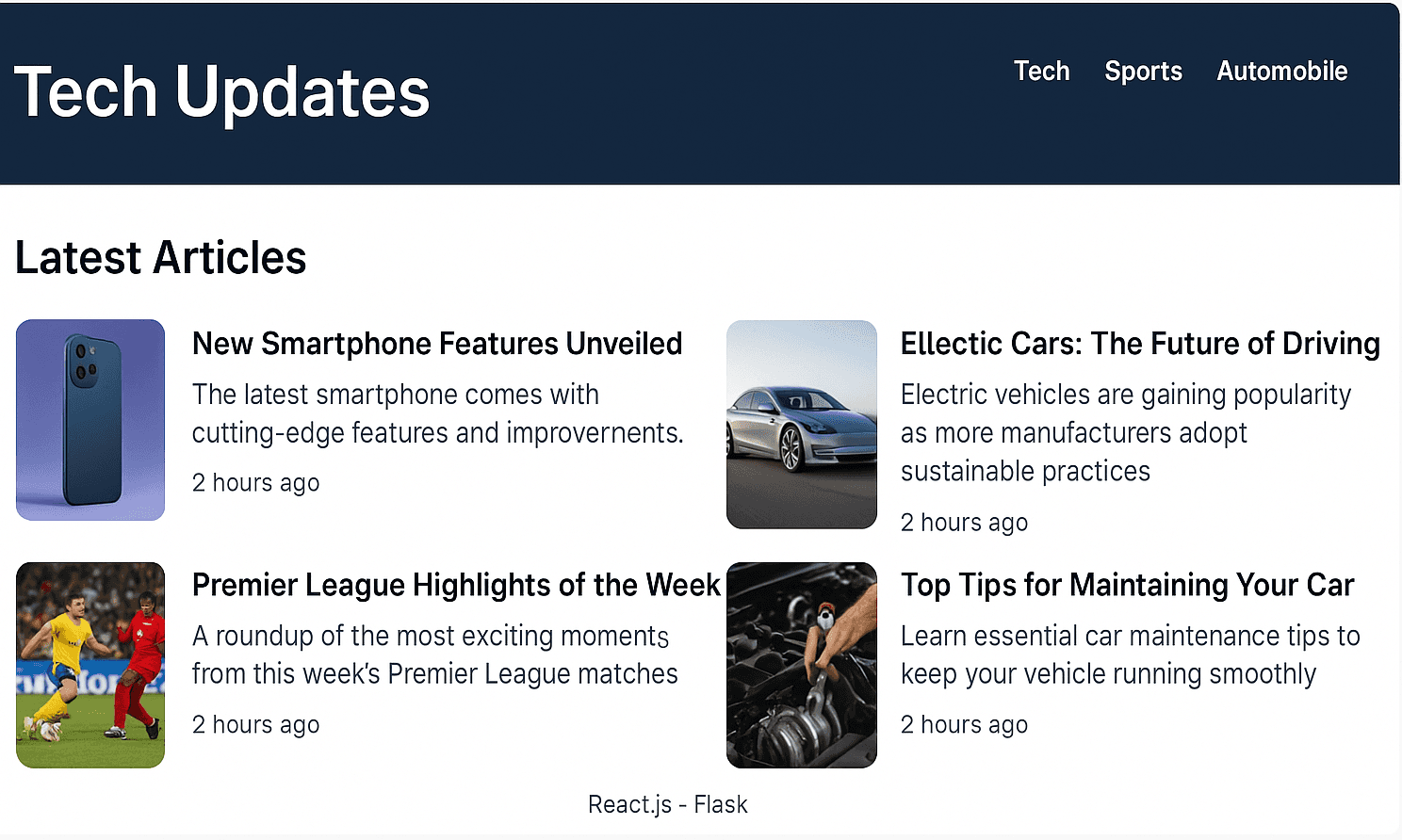
Overview
Tech Updates is a personal tech news aggregator. The pipeline pulls articles from a few sources I actually read, tags them with categories like AI/ML, startups, and web dev, and indexes them in a vector database so I can search the feed semantically. The React + Vite frontend displays the articles as tiles with pagination, dark mode, and a modal for details.
It is not a SaaS product. It is something I built so I would stop wasting twenty minutes every morning bouncing between tabs, and so I had a real reason to put a vector database and an LLM into the same app.
Why I built it
The problem was small but real. I was reading tech news from four or five sources, and there was no single place that pulled them together in a way that respected what I cared about. Most aggregators are either too broad (RSS readers that drown you) or too narrow (one source, one perspective).
I also wanted an excuse to play with vector search and LLM categorization. I had read about Qdrant and SentenceTransformers and wanted to wire them together myself instead of nodding along to blog posts. So this project did two things at once: solve my own annoyance, and let me build something end-to-end across scraping, an LLM pipeline, a vector DB, and a frontend.
How it works
The flow is straightforward, with each step doing one thing:
- Scrapers hit Medium, YC-related feeds, and Crunchbase and pull article metadata: title, details, source, URL.
- A categorization step calls Azure OpenAI to assign each article a topic such as AI/ML, startups, or web dev.
- Articles are written to scraped_data.json and categorized_data.json on disk.
- The same articles are embedded with all-MiniLM-L6-v2 and upserted into a Qdrant collection called tech_news.
- The Flask API exposes endpoints for triggering scraping, uploading to Qdrant, and running search.
- The React frontend fetches categorized_data.json, renders articles as tiles, and shows details in a modal, six per page.
A search request goes to /api/search, which embeds the query, asks Qdrant for the nearest vectors, and returns the matching articles with a similarity score.
System architecture
The system has five clear layers. Each one has a single job, and the contract between them is plain JSON.
Source-specific Python scripts collect articles and normalize them into a common shape (title, details, source, URL, category).
Utility functions clean the data and call Azure OpenAI to assign categories. Output is written to JSON.
Flask exposes blueprints under /api: scrape + categorize, upload to Qdrant, and search.
SentenceTransformers encodes queries into 384-dim embeddings. Qdrant searches the tech_news collection by similarity.
React + Vite reads categorized articles and renders the feed with tiles, modal, dark mode, and pagination.
Backend implementation
The backend is a Flask app organized around blueprints and utility modules. The main app file registers the API blueprint under /api, initializes Flask-APScheduler so scraping can run on a schedule, and wires up the routes. Qdrant credentials and the Azure OpenAI key load from a .env file through python-dotenv, which kept secrets out of source control from day one and meant I could publish the repo without a cleanup pass.
Each endpoint maps to a small utility function so the route handlers stay thin:
- scrape_and_categorize runs the scrapers, normalizes the output into a common Article shape, calls the categorization helper, and saves both scraped_data.json and categorized_data.json.
- upload_to_qdrant reads the categorized JSON, encodes each article with SentenceTransformers, and upserts the vectors along with a metadata payload (title, source, URL, category).
- search is the interesting one, and it gets its own section below.
Semantic search with Qdrant
Semantic search is what makes the feed feel different from a regular news reader. Instead of matching exact words, it compares the meaning of the query to the meaning of every article in the index.
The difference from keyword search shows up immediately. A query like "open source models that run on a laptop" can surface an article titled "Mistral 7B on consumer hardware." Keyword search would miss that. Semantic search does not, because the embeddings cluster on meaning rather than overlapping words.
Frontend implementation
The frontend is a React + Vite app written in TypeScript. It defines a small Article interface with the same fields the backend produces: Title, Details, URL, Source, Category.
The UI fetches /categorized_data.json once and renders the list. A few specifics worth calling out:
- Articles render as reusable Tile components, so the layout stays consistent across categories.
- Clicking a tile opens a Modal with the full article details and a link to the source.
- Dark mode toggles by adding a class to the root document element, so it survives page reloads.
- Pagination shows 6 articles per page so the feed stays scannable.
- The frontend is deliberately simple. The interesting work lives in the backend.
Key features
Multi-source scraping
Source-specific Python scrapers pull articles from Medium, YC-related feeds, and Crunchbase, then normalize them into one shape.
LLM categorization
Azure OpenAI assigns each article a topic like AI/ML, startups, or web dev, so the feed is sorted before I even open it.
Qdrant vector store
Articles are embedded with all-MiniLM-L6-v2 and upserted into a `tech_news` collection for similarity search.
Semantic search
Queries get embedded and compared against article vectors, so a search for an idea finds articles that share the meaning, not just the keyword.
Scheduled jobs
Flask-APScheduler triggers scraping from inside the API, so there is no separate worker process to babysit.
Clean React UI
React + Vite frontend with reusable Tile components, a Modal for details, dark mode, and pagination at 6 articles per page.
Technical stack
The full stack behind the pipeline, and what each piece is doing there.
Key decisions
A few choices I want to defend, because they are the ones a reviewer would push on first:
Flask over FastAPI
I wanted to ship a small REST API quickly. Blueprints made the layout obvious and I did not need anything that Flask could not give me.
JSON files instead of a database
This is a prototype. Plain JSON made the pipeline visible during debugging and meant I did not have to manage a schema while the data shape was still moving.
Qdrant for vectors
I wanted a purpose-built vector DB with a real API and an admin UI, not a library glued into the same Python process.
all-MiniLM-L6-v2 locally
Cheap, fast on CPU, and good enough for short article text. Using a hosted embedding API for a personal project felt like overkill.
APScheduler inside Flask
One process, one place to look at the schedule. For something only I use, a separate worker setup was not worth the operational cost.
React + Vite
Fast dev loop, no SSR needed, and Vite's HMR made iterating on the UI feel almost instant.
Challenges & takeaways
Challenges
- Every source had a different HTML or feed shape, so each scraper was written by hand. There is no generic scraper that ages well.
- Source sites change their layout without warning, and a broken scraper produces empty results silently unless you build health checks for it.
- Two sources covering the same story under different titles is a deduplication problem I did not fully solve. Embedding-based dedup is the obvious next step.
- Categorization quality depends a lot on prompt design and on whether article text is consistent. Short titles without a body category worse than I expected.
- Vector search needed real experimentation: different embedding models cluster differently, and picking a score threshold is more art than science on a small dataset.
- Wiring backend JSON into the frontend was a small but real decision: serve it from the API, copy it into the public folder at build time, or fetch it as a static file. I picked the third for simplicity.
- Calling Azure OpenAI in a loop hits rate limits fast. Batching plus retry with backoff is not optional once you are processing hundreds of articles.
What I Learned
- Designing an end-to-end pipeline is harder than the individual pieces suggest. Scraping is easy. Normalization, prompt design, and figuring out where data lives between stages is where the time goes.
- Vector databases are a real category of tool, not a buzzword. Once embeddings are stored properly, similarity queries become a one-liner.
- Keyword search cannot tell that two articles are about the same idea. Embeddings can, and that one fact justifies the whole vector DB stack.
- Data normalization beats model choice. A clean dataset with a small embedding model usually wins over a messy dataset with a fancier model.
- Flask + blueprints + a few utility modules is enough to ship a small API. I did not need to pick a framework war to finish this.
- Sometimes a frontend that fetches a static JSON file is the right answer. Not every project needs a separate API call for every screen.
- A personal project is the cheapest place to try new infrastructure. I would not have used Qdrant for the first time on something with a deadline.
Future improvements
Things I would do if I picked this up again, roughly in order of how much I would learn from each:
- Move from JSON files to a real database (probably Postgres) with a small ORM layer.
- Use embeddings to deduplicate stories that show up across multiple sources.
- Add user accounts so people can save categories or articles they want to follow.
- Generate short article summaries with the LLM, not just a category tag.
- Add structured logging and an admin dashboard for scraper health (last run, items pulled, errors).
- Score sources by reliability so noisy ones can be downweighted in the feed.
- Deploy backend and frontend separately with CI/CD instead of running it locally.
- Add tests for the parsers and API. Right now the parsers are tested by 'does it still work when I run it'.
- Improve the README so someone other than me can clone and run it in under ten minutes.